Active Directory Part 3 - Deep Dive
Active Directory is considered to be the foundation or backbone of IT environments for most organizations. It was designed by Microsoft as a ‘directory service’ for managing Windows domains, network resources, network-wide settings, and policies. AD is centralized, meaning it can manage domain resources such as users, computers, and file shares from a central database. This database is called the ‘Data Store’. More specifically, it’s a file called NTDS.dit that is stored on a Windows Server file system in this directory: ` %SystemRoot%\NTDS\ `. A Windows Server that manages NTDS.dit and is running AD is called a ‘Domain Controller’. The actual service, or ‘role’, running on the server is called ‘Active Directory Domain Services’ (AD DS).
Active Directory’s secondary (but equal) job is identity management. It is responsible for authenticating and authorizing users (or other ‘Security Principals’) to directory resources while also managing their privileges to those resources. It does this while also performing Single Sign-On (SSO). SSO is a way for users to log in one time and still access more than one resource on the network with specific permissions. The protocols AD uses for authentication and authorization include Kerberos, LDAP’s authentication mechanism, or NTLM authentication. (The last one being the least secure).
Without Active Directory, computers wouldn’t be able to connect to domains, and would instead use ‘Workgroups’ to manage network resources. Workgroups were the precursor to AD DS. They are primitive in that administrators would have to manage each computers’ security and settings locally, because there is no centralized system to work from. Since they are designed to operate in a peer-to-peer network model, Workgroups can only work in local networks. This makes administrative control over multiple networks more difficult.
This post will go into more detail on how Active Directory works ‘under the hood’ by explaining its structure and components. I intend to use this blog post as a personal ‘cheat sheet’ on the topic of Active Directory.
Domains, Trees, Forests, and Trusts
Windows Domains
A domain is simply a network structure where the authentication of “Security Principals”, such as user accounts and computers, is managed on a central server called a ‘domain controller’. These domain controllers can be replicated and act as a cluster of domain controllers for the same ‘domain’. Domains also act as a boundary for how policies are applied to objects within said domain. This means that if a policy is placed upon a group of users or computers, that policy gets applied within that one domain. Domains are frequently referred to by their “domain name” (such as ‘domainname.com’).
Trees
A tree is a collection of domains with one domain being the ‘root domain’. Root domains have a parent-child trust relationship with the other domains in the tree by sharing a namespace. This gives Active Directory its hierarchical structure. For example, we have a root domain called ‘mycompany.local’. You may need to create child domains from this domain for satellite offices of your company in different states. These child domains could be called ‘ga.mycompany.local’ and ‘ca.mycompany.local’ for the states Georgia and California respectively. Each one of these domains will have their own ‘Domain Administrator’ account to manage them.
Forests
Forests are groupings of trees and domains. They are the highest level of domain groupings an administrator can create. While domains within a tree must share the same namespace, forests connect trees and domains that have different namespaces. A real life example would be if a company acquisitioned another company and needed to connect both of their domains/trees together. They would have different namespaces but could still merge under a forest.
A forest is always created by default when installing Active Directory for the first time, so there will always be a forest. Domains within a forest share a few components such as a common schema, an Enterprise Admins group, and a common ‘Global Catalog’. A GC is essentially a domain controller that stores a copy of all objects in a forest.
With just single domains, the highest level user account would have been part of the ‘Domain Administrators’ security group. Now that we have trees and forests, ‘Enterprise Administrators’ exist in order to manage entire groups of domains.
Trust Relationships
The chains that bind domains into trees and forests are trust relationships. They are a way of establishing secure authentication and communication between Active Directory domains, trees, and forests. Trust can be characterized in two different ways: one-way vs two-way, or transitive vs non-transitive.
‘One-way’ trusts allow for simple one-sided relationship between two domains. For example, Domain A trusts Domain B. Therefore, users in Domain B can access resources in Domain A, but not the other way around. The second kind of trust relationship is called a ‘two-way’ trust. This is a ‘bi-directional’ and mutual relationship between two domains or trees.
Transitivity of trusts goes beyond one way or two-way relationships. A transitive trust can extend a one-way or two-way trust relationship beyond just two domains. An example of this would be: Domain A trusts Domain B. Domain B trusts Domain C. Therefore, Domain A trusts Domain C and all three domains trust each other. The opposite of this would be a non-transitive trust. These kinds of trusts do not allow a domains or forests to trust each other through a ‘middle man’. Trust is limited between the two entities and nothing beyond that.
Below are some of the few trust ‘types’ commonly found in Active Directory:
Parent-Child Trusts
When new sub-domains are attached to ‘root’ domains, a ‘parent-child’ relationship is formed along with the ‘tree’ structure. Parent-child trusts are two-way and transitive. This allows objects in a child domain to authenticate to the parent domain and vice versa.
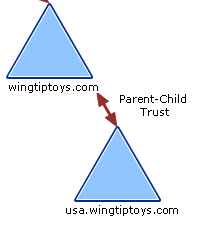 Parent-Child / Two-way Trust (Source: Microsoft Documentation)
Tree-root Trusts
‘Tree-root’ trusts are similar to parent-child trusts. Instead of connecting domains and creating trees, they connect the root domain of a forest to a root domain of a new tree in order to extend a forest. These trusts are also both transitive and two-way.
Cross-link Trusts
Sometimes connecting two domains within the same forest with their own special trust can speed up authentication. This is known as a ‘cross-link’ or ‘shortcut’ trust. They can be manually configured to be one-way or two-way, but they are usually one-way and transitive.
Forest Trusts
Trust relationships between forests are called ‘forest trusts’. Forest trusts allow administrators to link resources and objects across multiple forests, and they are transitive by default. They are considered transitive because objects in a child domain of one forest can authenticate into the second forest. This type of trust relationship is commonly used in corporate acquisitions and mergers. The diagram below shows an example of two forest trust relationships between three forests.
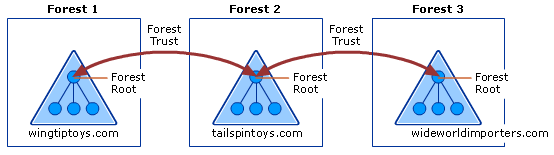 Example of Forest Trust Relationships (source: Microsoft documentation)
External Trusts
An ‘external’ trust connects two domains in separate forests where their respective forests are not connected by a forest trust. External trusts are non-transitive and can be either one-way or two-way.
Protocols
Active Directory utilizes a variety of protocols for both authentication and communication between domain objects. The most important ones used in AD are explained in the next few sections.
DNS
DNS, or ‘Domain Name System’, is a vital service in an Active Directory environment. AD would not be able to function without it because DNS is required to locate anything inside of a network. In the most basic terms, DNS is used to resolve hostnames to IP addresses, acting like a phone book for the network. It is used in pretty much any kind of network environment, not just Active Directory. In an Active Directory environment though, there are all kinds of nodes such as servers, computers, printers, etc, that need to locate and communicate with each other. Most importantly, they all need to be able to locate and communicate with the domain controller. Records of services that are available in a network are maintained by Active Directory using service records (or SRV). With these records, clients are able to locate any service or resource they need within a domain, tree, or forest. DNS uses both TCP and UDP port 53, but UDP is used by default.
MSRPC
MSRPC is like RPC, but Microsoft’s version of it. RPC, in the most simple terms possible, is a way for one computer program to run a function or process on a completely different computer over the network. Windows machines use MSRPC to access other systems in AD with four main RPC interfaces: lsarpc, netlogon, samr, and drsuapi. Each interface is used for specific tasks. For example, netlogon is required to authenticate users or services in the domain.
LDAP
Lightweight Directory Access Protocol, or LDAP, is a standardized protocol that allows for the access and management of directory information/services over a network. In more simpler terms, LDAP is like a ‘language’ that systems need to know in order to ‘speak’ to a directory service like Active Directory. A good parallel comparison is HTTP and web servers. Applications need to know the LDAP ‘language’ to talk to AD, just like they need to know HTTP to talk to an Apache or Nginx server.
The other main use for LDAP is authentication to Active Directory. Clients can use LDAP by utilizing a collection of ‘operation requests’. The operation used for authentication is called ‘BIND’. The ‘BIND’ operation establishes the authentication state for the client’s session. There are two kinds of bind requests:
- Simple Bind: Client may use a simple username and password to authenticate directory to the LDAP server or Domain Controller. Anonymous authentication is sometimes supported.
- SASL Bind: SASL, (or the Simple Authentication and Security Layer), is a framework that allows other authentication methods (like Kerberos or TLS certificates), to be “plugged” into the LDAP authentication process. Offloading the authentication method provides an extra layer of security.
Standard plaintext LDAP uses port 389, while LDAP over SSL/TLS (or LDAPS) uses port 636.
Kerberos
Kerberos is an open standard protocol for authentication that is maintained by MIT. It is used for many services such as NFS or Samba, but Microsoft maintains its own implementation of Kerberos for Active Directory. It is frequently used as the main method of authentication for AD, as it is more robust than NTLM and LDAP. Unlike the other two methods, Kerberos does not actually transmit passwords over the network. Instead, this protocol relies on a third-party server that produces and grants ‘tickets’ to clients which they can pass to services. This third party server is called the “Key Distribution Center” (KDC). Furthermore, the KDC is made up of two components that perform different roles: the Authentication Server and the Ticket Granting Service. How the KDC and its components work together in an AD environment is explained in the steps below.
Kerberos Authentication Steps:
- User logs in, generates a ‘authentication service request’ (or AS_REQ), and encrypts it with its own hashed (NTLM) password. The AS-REQ is then sent to the authentication server in the KDC.
- The Authentication Server knows the user’s password hash (shared secret), so it is able to decrypt the request after verifying the user’s identity. The KDC then generates and sends the client a “Ticket Granting Ticket” (TGT).
- The client passes the TGT to the Ticket Granting Server in order to request a Ticket Granting Service Ticket. This request is also called a ‘TGS_REQ’ or TGS request.
- If the TGT is valid, the TGS sends back the TGS ticket which is encrypted with the NTLM hash of the requested service. This is also called the ‘TGS_REP’ or TGS reply.
- The client then sends a Service Request, or ‘AP_REQ’, to the target service. The AP_REQ is made up of the encrypted TGS ticket created by the KDC.
- The service receives the AP_REQ and is able to decrypt the TGS ticket as it was encrypted by its own password. The server responds with an encrypted timestamp which the client can decrypt. This finally allows the client and server to be mutually authenticated with an encrypted communication session.
Kerberos is also different from NTLM and LDAP in that it offers SSO, or ‘Single Sign-On’. Users are only required to authenticate to the KDC one time every few hours, and the KDC is able to grant tickets for any resource that user is authorized to use.
Lastly, Kerberos runs port 88 for both TCP and UDP.
NTLM Authentication
The NTLM protocol is one the main authentication methods used in Active Directory. Variations of it have existed since the late 1980s. NTLM first started out as a simple hash called LAN Manager hash, or LM hash. It uses an old, and now insecure, algorithm called DES to hash passwords to store in the SAM and NTDS.dit databases. Passwords were limited to 14 ASCII characters, which are not case sensitive (converted to uppercase), and are also split into two 7 character chunks. These attributes made password cracking LM hashes extremely easy. LM has been discontinued and is disabled on most Windows operating systems.
After the LM hash, came the NT hash. Sometimes incorrectly called the “NTLM hash”, the NT hash is what more modern Windows operating systems use to store passwords. NT improves upon LM by using MD4 instead of DES. It also uses Unicode instead of ASCII for a wider range of characters, while also being case sensitive. NT hashes do not split the password into two chunks, but are able to hash whole passwords that are greater than 14 characters.
Finally, we can talk about the NTLM protocol (A.K.A. Net-NTLM). The first version, NTLMv1, performs a challenge-response protocol to authenticate a client using both its NT hash and LM hash. Below are the steps of the challenge-response process:
- Client sends a negotiation message to the server containing its username.
- Server sends back an 8-byte challenge message to verify the client’s identity.
- The client responds with an “authenticate” message. This is computed using the sent ‘challenge’ value, the NT hash, and LM hash. Then it’s encrypted with DES.
- Lastly, the server validates and sends a validation message to the client if everything checks out.
Net-NTLMv2 improves upon v1 and is the most current NTLM protocol in Active Directory. Version 2 uses stronger encryption algorithm (HMAC-MD5). Two responses are sent back to the challenging server instead of one. Both responses include a 16-byte HMAC-MD5 hash of the server challenge, a challenge the client generates, and a HMAC-MD5 hash of the user’s NT hashed password. The responses differ in that the second response also includes a timestamp, a 8-byte random nonce value, and the domain name.
AD Objects
AD DS Schema
Before we talk about AD Objects, we should first mention the “Schema”. The Active Directory Schema is almost like a ‘blueprint’ (or set of rules) of an enterprise network. The Schema defines the ‘class’ or type of object that can exist in the AD database. It also lists the corresponding attributes associated with those object classes. An example of a class would be the class ‘computer’, and the object ‘PC1’ would be an instance of the class ‘computer’. An attribute of the object ‘PC1’ would be its actual name “PC1”. Attributes to the class ‘user’ would be something like ‘First Name’, ‘Last Name’, ‘email address’, etc.
Security Principals
One more type of identifier is the 128-bit hexadecimal “Global Unique Identifier” (GUID). These are assigned to all types of objects, whether these objects are ‘security principals’ or not. They are “globally unique”, meaning they are unique to the entire forest, rather than just a domain. SIDs on the other hand are only unique to a single domain.
Another type of identifier is the 128-bit hexadecimal “Global Unique Identifier” (GUID). These are assigned to all types of objects, whether these objects are ‘security principals’ or not. They are “globally unique”, meaning they are unique to the entire forest, rather than just a domain. SIDs on the other hand are only unique to a single domain.
Users
User objects are accounts that humans use to authenticate to the domain. They are considered ‘leaf objects’, which means they are objects that can’t contain other objects inside of them (like the very ends of a ‘tree’ branch). User objects are also security principals. Therefore, they each get their own SID and GUID. Users have attributes such as ‘First Name’, ‘Last Name’, or ‘email address’. These attributes are defined by the Schema.
Computers
By joining computers to the Active Directory network, users can be given permissions to log into any computer on the network. This is all done without having to manage accounts locally on each individual computer. Computers are leaf objects too. Like users, they are also ‘security principals’, so they get assigned both SIDs and GUIDs.
Security Groups
The ‘group’ or ‘security group’ object in Active Directory are not leaf objects. Rather, they are ‘container objects’. This means they can contain other objects such as users and computers within them. Security groups are a way to manage permissions or access over domain resources. For example, if a file share should only be accessed by the HR department of an organization, users and computers placed in the “Human Resources” group would be granted that access through the group permissions.
Organizational Units
Another type of container object are Organizational Units, or OUs. These containers are mostly used for delegating tasks to certain users, such as being able to reset passwords for another group of users within a certain OU. OUs can contain other OUs within them to create nested OUs. They can also be used for applying Group Policies over groups of users and computers. (I will go into Group Policy in more detail later in this post.)
Other Objects
- Shared Folders
- Not only can multiple users share a single computer on AD, but they can also share a folder. This is done with a file sharing protocol called SMB.
- Shared folder objects can have very strict access control applied to them.
- Shared folders are not security principals, so they only have GUIDs and no SIDs.
- They also have attributes such as the name, file location, and access rights.
- Printers
- Printers are a physical resource that need to be shared in most office spaces. Being able to share them over the network saves employees a lot of time and effort.
- They are leaf objects.
- Printers are not security principals, which means they do not have a SID but they do get assigned a GUID.
- Contacts
- These objects represent external users.
- Contain attributes like first name, last name, email, telephone, etc.
- Leaf objects.
- Not security principals, so no SIDs but they do have GUIDs.
- Foreign Security Principals
- Represents security principals that belong to a foreign but trusted domain or forest.
- The FSP object is really just a placeholder that contains the SID of the real foreign object.
- Created automatically when an object such as a user, computer, or group from an external forest is added to a group existing in the current forest.
- Built-in
- A container that contains default groups and users that get created when AD gets installed.
Types of Accounts
There are two ways accounts can be stored: locally or domain-joined.
Local User Accounts
Local user accounts are specific to an individual server or workstation, allowing access only to that particular host. They can be granted rights either individually or through group membership, but these permissions are limited to the standalone system and cannot extend across a domain. Here are some default accounts that are local to every Windows system:
- Administrator: This account has full control over every file or resource on a Windows machine.
- SYSTEM: Also known as NT Authority\SYSTEM. This is THE default account on every Windows host. It is the account the operating system uses to perform its functions. SYSTEM has the highest permissions possible, and is sometimes compared to the ‘root’ account on Linux.
- Guest: Allows ‘guest’ users to log in with very limited permissions. It has no password and is disabled by default.
- Network Service and Local Service: These two are used to run Windows Services. Network Service has more privileges for connecting to remote services.
Custom local accounts are usually only created on machines that are not connected to a domain.
Domain-Joined Accounts
Domain user accounts, on the other hand, have broader capabilities, as they are managed through the domain and can access shared resources like file servers, printers, and file shares. Unlike local accounts, domain accounts allow users to log in from any host within the domain.